Git is a Database
Git is a Database

You've probably typed git add, git commit and git push a hundred times.
But have you ever stopped to wonder what actually happens when you hit Enter?
If you have - great. If not, no worries. That's exactly what we are going to explore in this blog.
Let me start by establishing a key idea upfront:
Git is a Database
We'll come back to this, but this is the core idea around which everything revolves.
At the storage level, git is an object database, every file, every folder, everything, becomes an object.
However, at the version control level, where we operate, the smallest logical unit is a commit.
So, what are these objects ?
PART 1 : The Theory
Git Objects
Objects are the fundamental storage unit of git. We mainly have blob (file content), tree (directory) and commit (snapshot of the staging area (index)). Understanding these will help you grasp the working model of how git manages and tracks commits.
What is a blob?
Blob is just your raw file content, zlib compressed. To identify this blob, we simply take a SHA-1 hash of its content, this becomes a unique identifier of a particular version of a file, changing the content changes the hash. When we do git add <filename>, it creates a new blob for that file.
What is a tree?
A tree object represents a directory. It maps filenames to object hashes, and can reference:
- blobs(files)
- other trees (subdirectories) This allows git to represent an entire directory hierarchy using recursive structure.
When you run git add dir/, Git:
- Creates blobs for individual files
- Creates tree objects that references these blobs
- Recursively builds higher-level trees for subdirectories Each tree is immutable and identified by its hash
Let's look at a tree object.
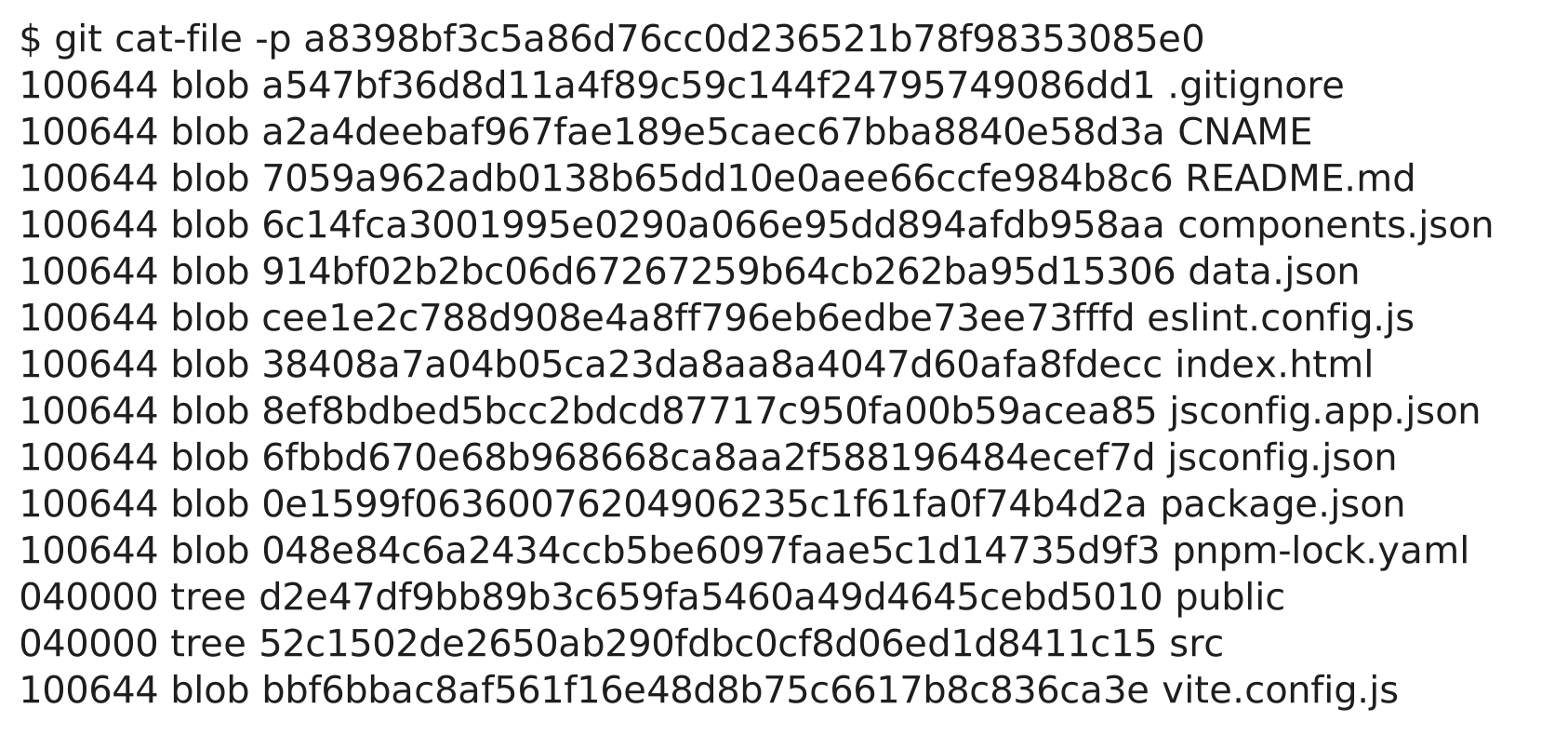 see, it represents the root directory, containing files, and other directories.
What is a Commit?
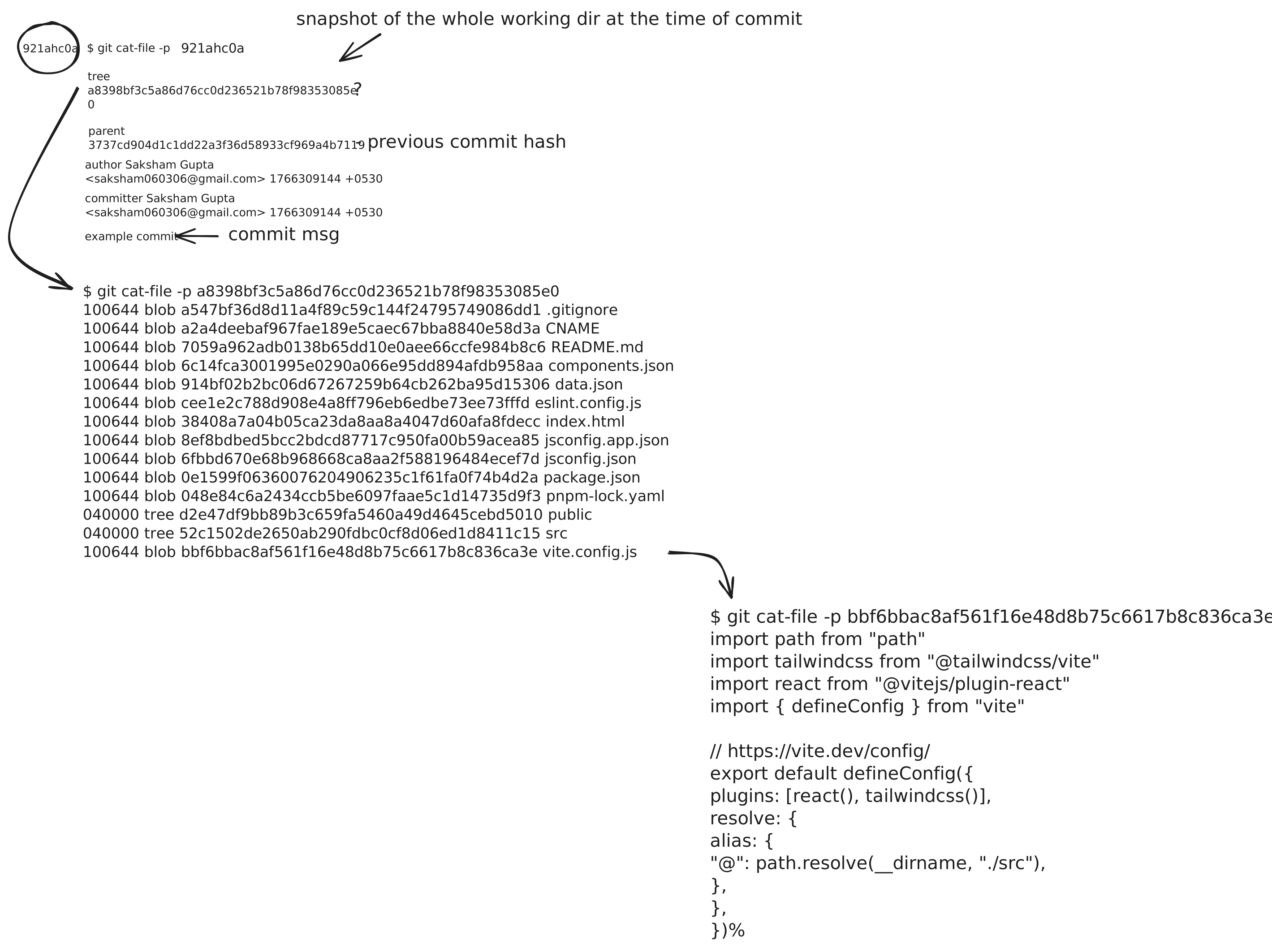
A commit is a snapshot of the staging area (index), at the moment of executing git commit .
A commit object contains :
- a reference to a root tree (the snapshot)
- one or more parent commit references
- metadata (author, timestamp)
- a commit message
In other words, a commit does not store files directly. It stores a pointer to a tree, which stores the pointers to the files and subtrees.
Because of this, we can completely construct all the files from a single commit hash, given the .git folder is intact.
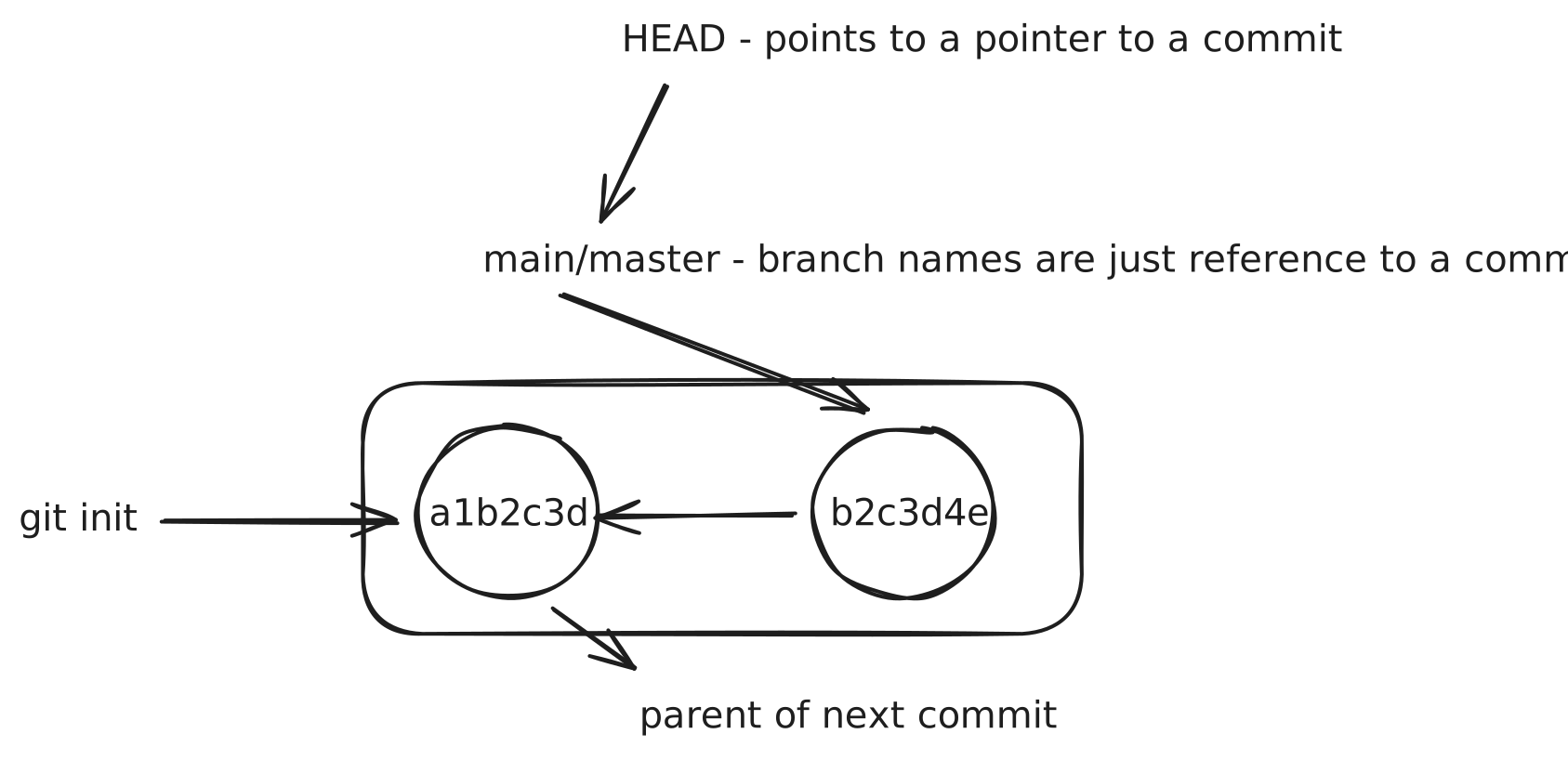
commits form a directed acyclic graph (DAG), where each commit references one or more parent commits. In the common case, this graph is linear.
 Each circle in this diagram is a commit, after
 git init, and doing git add and git commit, our first commit is created, i.e. a1b2c3d .
From the diagram, we can also see, that main or master, is simply a reference to a commit. Branches in Git do not contain commits, they just point to them. This is why branching is so cheap; because we just need to create a new reference.
Another small, but important concept, HEAD.
HEAD usually points to a branch reference, which in turn points to a commit.
In a detached HEAD state, HEAD points directly to a commit.
HEAD indicates the current position of our repository.
Each time we create a commit on a branch, the branch reference moves forward, which updates the HEAD automatically since it refers to the reference.
most of the theory is done, but theory can only take us so far, so, lets fire up the terminal and type some commands.
PART 2 : Git in Action
Aight, the theory's over, now, lemme actually make a new project and show how each git command translates.
i'm creating a barebones go project -
1~/dev/test2❯ go mod init example3go: creating new go.mod: module example45~/dev/test via 🐹 v1.25.56❯ touch main.go
Let's also initialise a fresh git repository -
1~/dev/test via 🐹 v1.25.52❯ git init3Initialized empty Git repository in /Users/sakshamgupta/dev/test/.git/
now, what git init does is, it creates a .git folder, this is the source of truth of your repository, it contains each and everything you ask git to track.
Let's take a look at the structure of .git folder -
1❯ tree .git2.git3├── HEAD4├── config5├── description6├── hooks7│ ├── applypatch-msg.sample8│ ├── commit-msg.sample9│ ├── fsmonitor-watchman.sample10│ ├── post-update.sample11│ ├── pre-applypatch.sample12│ ├── pre-commit.sample13│ ├── pre-merge-commit.sample14│ ├── pre-push.sample15│ ├── pre-rebase.sample16│ ├── pre-receive.sample17│ ├── prepare-commit-msg.sample18│ ├── push-to-checkout.sample19│ └── update.sample20├── info21│ └── exclude22├── objects23│ ├── info24│ └── pack25└── refs26 ├── heads27 └── tags
too much to digest at once, but don't worry, i will walkthrough things gradually.
.git dir has mainly 4 important things -
- HEAD
- config
- objects
- refs
Let's create a commit -
1❯ git commit -m "test"2[main (root-commit) be5e126] test3 2 files changed, 10 insertions(+)4 create mode 100644 go.mod5 create mode 100644 main.go
now, let's look at the .git folder to see, if anything changed
1❯ tree .git2.git3├── COMMIT_EDITMSG4├── HEAD5├── config6├── description7├── hooks8│ ├── applypatch-msg.sample9│ ├── commit-msg.sample10│ ├── fsmonitor-watchman.sample11│ ├── post-update.sample12│ ├── pre-applypatch.sample13│ ├── pre-commit.sample14│ ├── pre-merge-commit.sample15│ ├── pre-push.sample16│ ├── pre-rebase.sample17│ ├── pre-receive.sample18│ ├── prepare-commit-msg.sample19│ ├── push-to-checkout.sample20│ └── update.sample21├── index22├── info23│ └── exclude24├── logs25│ ├── HEAD26│ └── refs27│ └── heads28│ └── main29├── objects30│ ├── 3731│ │ └── 4046752f99ce801580aa6b2a891263ed54814532│ ├── be33│ │ └── 5e126f8f7b57e14073f028f8e8f8679616fe8834│ ├── c035│ │ └── 4811917f0218be3c10c48c5d26f129a82812f236│ ├── d337│ │ └── cb48db14c92ca44211414f1929d6aee95f7eb838│ ├── info39│ └── pack40└── refs41 ├── heads42 │ └── main43 └── tags
so, we can see a new entry under refs/heads, index and 4 new objects, and from our basic intuition, we can guess, that, 2 objects are our two files go.mod, main.go, one is a tree and one is a commit.
Let's confirm this :
1❯ git cat-file -p be5e126f8f7b57e14073f028f8e8f8679616fe8823tree 374046752f99ce801580aa6b2a891263ed5481454author Saksham Gupta <saksham060306@gmail.com> 1767541512 +05305committer Saksham Gupta <saksham060306@gmail.com> 1767541512 +053067test
and, lets see the tree also :
1❯ git cat-file -p 374046752f99ce801580aa6b2a891263ed5481452100644 blob d3cb48db14c92ca44211414f1929d6aee95f7eb8 go.mod3100644 blob c04811917f0218be3c10c48c5d26f129a82812f2 main.go
let's create a new commit, adding a new hello.txt file :
1❯ git cat-file -p b4f2affdb577ac5a1bdfb7f7ee74de1c143d8c3123tree 455fae52133ca350a5c7a695610afdfefbb884364parent be5e126f8f7b57e14073f028f8e8f8679616fe885author Saksham Gupta <saksham060306@gmail.com> 1767542639 +05306committer Saksham Gupta <saksham060306@gmail.com> 1767542639 +053078add hello.txt910test on main via 🐹 v1.25.511❯ git cat-file -p 455fae52133ca350a5c7a695610afdfefbb8843612100644 blob d3cb48db14c92ca44211414f1929d6aee95f7eb8 go.mod13100644 blob 3b18e512dba79e4c8300dd08aeb37f8e728b8dad hello.txt14100644 blob c04811917f0218be3c10c48c5d26f129a82812f2 main.go
we can see, this new commit, has a parent commit, which refers to previous commit, and the tree refers to the same file commits for go.mod and main.go, as they were unchanged. so, we just need a tree-hash to restore all the file for a particular commit.
The index file
We’ve seen that a commit is a snapshot of the staging area — but what exactly is this staging area, and why does Git need it?
The index (also called the staging area) represents the exact contents of the next commit. It is Git’s proposal for what the repository should look like when the next commit is created.
Git never commits directly from the working directory. Instead, it commits from the index.
Internally, the index is a binary file stored at .git/index. It maps file paths to blob hashes, along with metadata such as file mode and timestamps. The index does not store file contents itself — it only references objects that already exist in Git’s object database.
Because of this design, the index acts as a precise and explicit boundary between:
- what exists in the working directory, and
- what will be recorded in history
At its core, git is actually pretty simple, and which is why its hard to design such a thing in the first place. Heil Linus
That's a wrap for now, i have skipped over a few small things like packfiles, reflogs, diffs, garbage collection etc. , you can gippity them easily.